

How One Phishing Email Compromised 18 npm Packages and Billions of Installs
Shubham JhaSeptember 9, 20255 min read
On September 8, 2025, the npm ecosystem faced its most damaging supply chain attack to date. With one phishing email, an NPM Package Compromised gave attackers access to 18 high-profile JavaScript libraries maintained by Josh Junon (npm username: qix). Together, these packages account for over 2.6 billion weekly downloads.
The compromise wasn’t the result of zero-day exploits or advanced malware implants. It was a straightforward phishing campaign that tricked a maintainer into handing over credentials and 2FA codes. From there, attackers slipped crypto-stealing code into packages used across thousands of projects.
This post breaks down what happened, how the attack worked, which packages were affected, what the malware did, and most importantly, what the community can learn from it.
Total weekly downloads: ~2.6 billion.
Because many of these are dependencies of dependencies, any project running npm install during the compromise window could have pulled the malicious code without realizing it.
How the Phishing Attack Worked
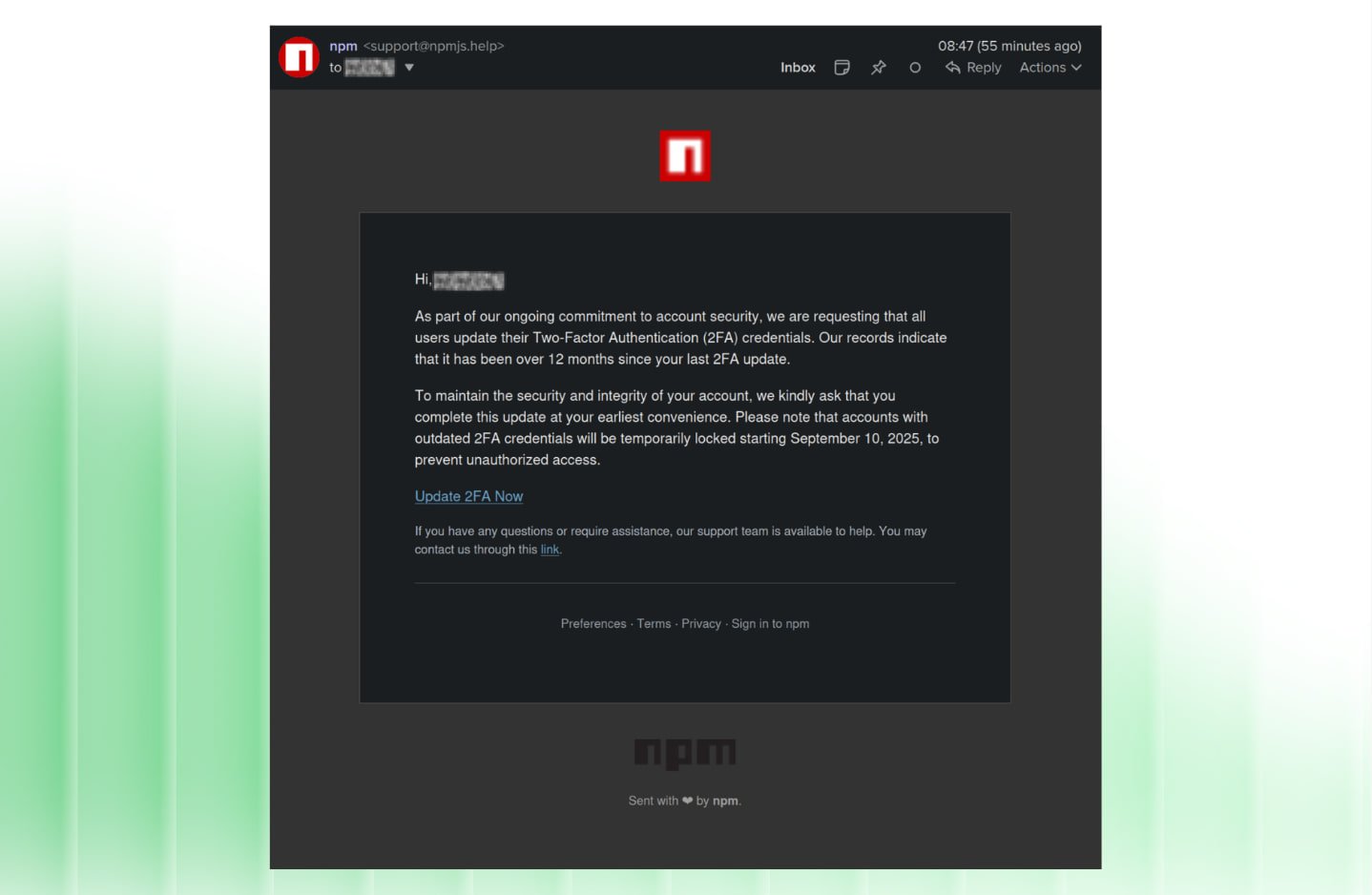
It started with an email that looked ordinary enough. On September 4, 2025, attackers registered npmjs.help, a domain crafted to mimic npm’s official npmjs.com, and began sending messages disguised as support notices. The email used classic phishing tactics:- Urgency: claimed a “mandatory 2FA update” was required within 48 hours.
- Fear: warned that accounts would be locked starting September 10.
- Impersonation: copied npm’s branding and even included a fake verification checkmark.
“The phishing email that compromised the maintainer account. Notice the spoofed domain, the urgency tactic, and the malicious link to a fake login page.”Maintainer Josh Junon received one of these messages on his phone. On a small screen, the difference between npmjs.help and npmjs.com was almost invisible. He tapped the link, landed on what looked like the npm login page, and entered his username, password, and TOTP code.
Why it Worked
- npm accounts don’t yet enforce phishing-resistant 2FA like WebAuthn.
- Phone usage increases risk: small screens, autofill quirks, and multitasking make malicious pages harder to spot.
- The ecosystem still relies heavily on single maintainers, leaving no safety net when one person is compromised.
The Packages that Were Hit
These weren’t fringe utilities. The attackers gained control of libraries like chalk, debug, and ansi-styles, which are buried deep in the dependency trees of frameworks and CLI tools.| Package Name | Weekly Downloads (M) | Use Case | Compromised Version(s) |
| ansi-styles | 371.41 | Terminal styling codes | 6.2.2 |
| debug | 357.6 | Debugging utility | 4.4.2 |
| chalk | 299.99 | CLI string styling | 5.6.1 |
| supports-color | 287.1 | Terminal color detection | 9.5.1 |
| strip-ansi | 261.17 | Removes ANSI codes | 7.2.1 |
| ansi-regex | 243.64 | Regex for ANSI sequences | 6.1.1 |
| wrap-ansi | 197.99 | Text wrapping | 8.1.1, 9.0.1 |
| color-convert | 193.5 | Color conversions | 2.1.1 |
| color-name | 191.71 | Color lookups | 1.2.1 |
| is-arrayish | 73.8 | Checks for array-like objects | 0.4.1 |
| slice-ansi | 59.8 | Slices styled strings | 5.1.1 |
| error-ex | 47.17 | Enhanced error handling | 1.4.1 |
| color-string | 27.48 | Parses color strings | 1.10.2 |
| simple-swizzle | 26.26 | Argument handling | 0.2.3 |
| has-ansi | 12.1 | Checks for ANSI codes | 3.1.1 |
| supports-hyperlinks | 19.2 | Terminal hyperlink detection | 3.1.1 |
| chalk-template | 3.9 | Template literals for chalk | 0.5.1 |
| backslash | 0.26 | Escape handling | 0.1.1 |
Inside the Malicious Code
The payload wasn’t designed for server-side takeovers. Instead, it was a crypto clipper targeting browser contexts where web3 wallets are active.How it Operated
- API hooking: It intercepted functions like fetch, XMLHttpRequest, and wallet APIs (window.ethereum, window.solana).
- Address swapping: Detected cryptocurrency addresses, then swapped them with attacker-controlled ones using Levenshtein distance to keep them visually similar.
- Chains targeted: Ethereum, Bitcoin, Solana, Tron, Litecoin, Bitcoin Cash.
- Obfuscation: String encoding, variable renaming, and dead code to evade scanners.
Why it Wasn’t Worse
Security researchers called it a missed opportunity for the attackers. Instead of installing backdoors or exfiltrating secrets, they narrowed in on crypto transactions. Actual stolen funds amounted to under $50, mostly in minor tokens.Timeline of the NPM Package Compromised Incident
- Sept 4: Phishing domain registered.
- Sept 8 (morning): Emails sent. Junon’s account compromised.
- Sept 8 (9–11:30 AM ET): Malicious versions published.
- Sept 8 (afternoon): Maintainer and researchers detect the issue. Mackenzie Jackson posts a public alert. Socket and Aikido flag packages.
- Sept 8 (evening): npm begins removing compromised versions. GitHub advisories released (initially overbroad).
- Sept 9: Most packages yanked. npm audit signatures updated.
The Real Impact
- Financial loss: ~$50 in ETH and memecoins.
- Potential exposure: Any fresh install or update during the window.
- Community fallout: Renewed scrutiny of npm security, single-maintainer risks, and dependency sprawl.
What Developers Should Do Now
Detect and clean up
- Scan repos for malware signatures, e.g.: rg -u --max-columns=80 _0x112fa8
- Run npm audit (updated with new advisories).
- Check package-lock.json for affected versions.
Mitigation
- Pin known safe versions:
"overrides": {

  "chalk": "5.3.0",

  "debug": "4.3.4",

  "strip-ansi": "7.1.0"

}
- Avoid blind auto-updates from bots without review.
Prevention
- Use phishing-resistant 2FA (hardware keys, WebAuthn).
- Never log in through email links—type the domain directly.
- Audit dependency chains and reduce reliance on micro-packages where possible.
What the Ecosystem Must Address
This incident reignited calls for npm and similar registries to adopt:- Code signing for all published packages.
- Human review of updates to libraries with >1M downloads.
- Provenance statements to track builds.
- Shared maintainer ownership for critical packages.