
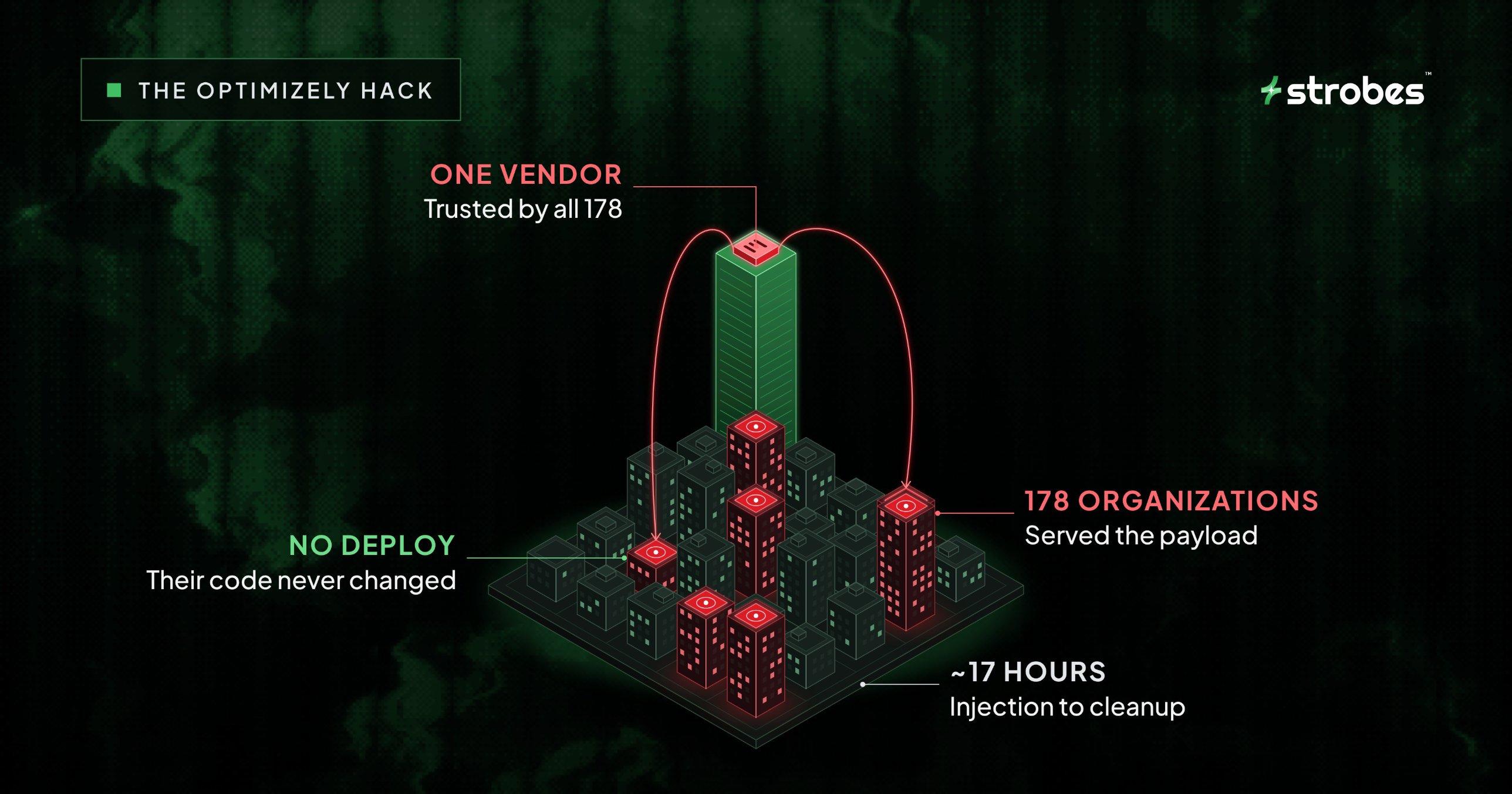
Optimizely hack hit 178 organizations without a single deploy

TL;DR
- ✓In the Optimizely hack on November 16, 2026, an attacker added malicious JavaScript to Optimizely Web projects. Optimizely's CDN then served it on sites run by 178 organizations, including Zoom, the BBC, CNN and HSBC.
- ✓The code was built to swap crypto wallet addresses, skim payment cards, grab cookies and screenshots, and send older iPhones to exploit kits.
- ✓Optimizely says the attacker exploited a vulnerability in its Experimentation account signup flow. It says it has fixed the flaw, removed the code and notified affected customers.
- ✓The victims' own code never changed. The malicious code arrived through a vendor script they already trusted.
- ✓If you run Optimizely Web, review your Project JavaScript, rotate credentials and API tokens, and check your logs for the indicators listed below.
Your website can serve malicious code even when your team hasn't shipped anything. That's what happened to 178 organizations on November 16. At the BBC, Zoom, CNN and others, the malicious code arrived through Optimizely, an A/B testing tool they had added to their sites on purpose, completely outside their own release process.
Here's what happened, how it worked, and what to check on your own site this week.
What happened in the Optimizely hack?
An attacker got the ability to edit Optimizely Web projects belonging to 178 organizations and planted a loader script in each one. Optimizely's CDN then delivered that script to visitors on every page that loaded an affected snippet.
Optimizely Web is an experimentation tool. Marketing and product teams use it to run A/B tests, like showing half your visitors a green button and the other half a blue one. To make that work, each site loads a small JavaScript file, called a snippet, from cdn.optimizely.com. Whatever sits inside that snippet runs in the visitor's browser.
Here's how it played out.
| Time (UTC) | What happened |
|---|---|
| Nov 16, 04:21 | First injected code shows up in the BBC's snippet |
| Nov 16, 08:28 | The payload, track.js, is first seen loading on bbc.com |
| Nov 16, 11:20 | Zoom's snippet is modified |
| Nov 16, 13:03 | Funds in the attacker's wallets start moving to exchanges |
| Nov 16, 13:43 | A card skimmer is added to the payload |
| Nov 16, 17:13 to 17:57 | A second batch of iOS exploit domains goes live |
| Nov 16, 20:40 | Mass cleanup begins |
| Nov 16, 21:52 | Only one of the 188 infected snippets, TalkTalk's, is still infected |
| Nov 17, 01:02 | Optimizely posts an incident notice confirming the attack |
From the first injection to mass cleanup took close to 17 hours.
The count comes from security researchers who checked 1,611 Optimizely snippets and found the malicious code in 188. Those snippets belonged to 178 organizations. Banking and finance had the most victims (32), followed by technology (23) and retail (20). The researchers say the real number is likely higher.
Optimizely has since explained how it happened, at least in part. In a security incident notice, the company said an unauthorized party exploited a vulnerability in Experimentation and used it to “add malicious JavaScript to some customer projects.” In a statement to the press, Optimizely said the flaw was in its signup process for Experimentation accounts. The company says it has “fixed the vulnerability and removed the injected code,” secured affected accounts and notified customers. It hasn’t published technical details of the flaw yet.
How did the malicious code reach so many sites?
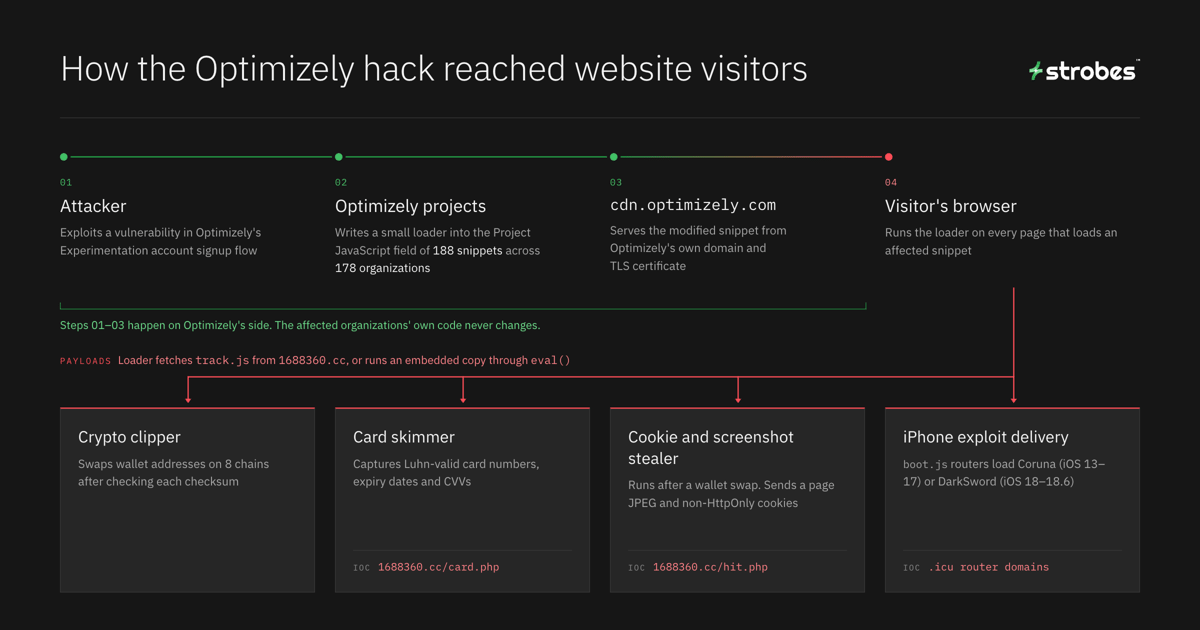
The attacker used a feature called Project JavaScript. It's a field in each Optimizely project where customers add their own custom code, and Optimizely runs it on every page where the snippet loads.
The attacker wrote a small loader into that field and left the rest of the snippet alone. So the file still came from Optimizely's domain, with Optimizely's TLS certificate, and the browser had no reason to treat it differently.
The CDN itself wasn’t compromised. Researchers ruled out cache poisoning and put it simply: “Optimizely’s CDN served exactly what it was given.”
The loaders came in three styles: a plain <script> tag, a base64-encoded URL decoded with atob(), and a full inline copy run through eval(). The first two fetched the main payload, track.js, from a domain called 1688360.cc. The eval() variant carried its own embedded copy, so it didn't need to download anything. That difference matters for defense, because blocking the download does nothing against the embedded copy. The attacker rebuilt track.js 26 times that day, and a 15-second cache-control header let each new version reach visitors almost right away.
This is also why checks built around your own releases can miss an attack like this. Code review, SAST and deploy pipelines look at what your team ships. A change made inside a vendor's dashboard never passes through them, so you also need monitoring that watches what actually loads in the browser.
What did the malware do to visitors?
The track.js payload was about 30 KB and carried four modules. Whether a visitor was affected depended on whether their page loaded the snippet and what they did on that page.
-
Crypto clipper. It looked for wallet addresses on eight chains (BTC, ETH, TRON, Solana, TON, LTC, BCH and DOGE), checked each checksum, and swapped in the attacker's address. It hooked page text, form fields, links, copy events, the clipboard API, navigator.share, fetch and XHR. So a deposit address you copied could paste as the attacker's.
-
Cookie and screenshot stealer. This one only ran after the clipper swapped an address on a visible element, and then once per page load. It used html2canvas to take a JPEG of the page and sent it to /hit.php with the URL, up to 8,000 characters of document.cookie and the original addresses. Visitors who never handled a wallet address didn't trigger it, and HttpOnly cookies were out of its reach.
-
Card skimmer. Added at 13:43 UTC and separate from the clipper, it watched for Luhn-valid card numbers, expiry dates and CVVs, then sent them to /card.php with navigator.sendBeacon. Hosted payment iframes from providers like Stripe and Adyen were out of its reach.
-
iPhone exploit delivery. It loaded boot.js routers from .icu domains that picked an exploit kit by iOS version: Coruna for iOS 13 to 17, DarkSword for iOS 18 up to 18.6, and only a fingerprinting step for iOS 26. Older iPhones were forced to reload the page every 60 seconds.
That list describes what the code was built to do. Confirmed harm is a separate question. Researchers note that the iPhone findings are delivery observations, not proof that any device was compromised. The same caution applies to cards and cookies, since nobody has published confirmed victim counts yet.
The crypto side is easier to trace, though the number comes with a catch Researchers estimate that the attacker’s wallets held or received about $6,600 in crypto, most of it from one Bitcoin payment worth about $4,970.. Some of that wallet activity came before the campaign started, so how much of it this attack actually brought in is still unclear.
Why does a third-party script count as your attack surface?
Because it runs with the same power as your own code. Once a script loads on your page, the browser lets it read the page, watch form fields and send data out.
Most teams map their attack surface by what they own: domains, IPs, cloud accounts and APIs. Third-party scripts often sit outside that map. Marketing adds an A/B testing tool, support adds a chat widget, and someone drops an analytics tag into a tag manager. Each of those vendors can then change code that runs for your users.
This has happened before. In 2024, the Polyfill.io domain changed hands, and its new owner began injecting malicious code that reached more than 100,000 sites. Closer to home, a smaller wave starting November 13 pushed webshell.lol/get.js through Kissmetrics, StorifyMe and Minute Media scripts.
So a useful script inventory has to record more than names. For each script, you need to know who can change it, where that change happens, and how you'd notice. Here's what that looks like on a typical marketing site:
| Script | Business owner | Who can change it | Where the change happens | Pages where installed | How you'd detect a change |
|---|---|---|---|---|---|
| A/B testing tool | Growth or marketing | Your project users, API tokens and integrations, plus the vendor's own access and publishing systems | Vendor dashboard, no deploy needed | List the URLs or page groups | Script change monitoring, outbound request monitoring |
| Tag manager | Marketing ops | Container publishers, plus the vendor | Vendor dashboard, no deploy needed | List the URLs or page groups | Version history and publish alerts, script change monitoring |
| Chat widget | Support | The vendor | Vendor's CDN | List the URLs or page groups | Script change monitoring, outbound request monitoring |
| Analytics tag | Marketing | The vendor | Vendor's CDN | List the URLs or page groups | Script change monitoring, outbound request monitoring |
| Card form | Engineering | Your team, or your payment provider for a hosted iframe | Your repo, or the provider's systems | Checkout | Code review for your own form |
Any row where the change happens outside your deploy process can skip code review entirely, unless you've set up a separate review for it. That's exactly where the Optimizely hack came in. CSP reports help here, but they only flag policy violations, so a change inside a script you already allow won't trigger one.
Content Security Policy (CSP) is one control that could have stopped this attack, and few affected sites had it set up that way. Published research results list 24 organizations where CSP blocked the payload, and 17 where it let the payload run but blocked the data it tried to send out. Another 50 allowed both, and 68 had no CSP at all.
What should you do right now?
Start with Optimizely if you use it. Then apply the same checks to every third-party script on your site.
If you run Optimizely Web
-
Review every project's Project JavaScript and experiment custom code for anything your team didn't add, such as unfamiliar script tags or atob() calls. Compare what you find against the indicators below, since atob() on its own doesn't prove anything malicious.
-
Save copies of anything suspicious before you remove it, so you can analyze it later.
-
Audit who can write to your Optimizely account, including users, API tokens and integrations, and rotate those credentials.
-
Search your proxy, DNS and CSP report logs for the indicators below, starting from 04:00 UTC on November 16.
-
If affected pages included your own card form (rather than a hosted payment iframe), treat cards entered during the exposure window as exposed until you can confirm otherwise.
-
Invalidate sessions that relied on non-HttpOnly cookies on affected pages, and make those users sign in again.
A clean file today doesn't prove it was clean on November 16. BreachHistory fetched twelve of the named bundles the next day and found nothing, because cleanup had already happened.
Indicators of compromise
| Indicator | What it was used for |
|---|---|
| 1688360.cc (136.113.106.136) | Payload host serving /track.js, /card.php, /hit.php and /html2canvas.min.js |
| 5vobauua3ojpklx.icu, eil786npto9u5bq.icu, l7bcsnwc7nzr3uo.icu, p55abnw2pnsz0bo.icu, 1y69gy2mdzaltz1.icu, gm38duxoihbmy5o.icu | iOS exploit routers serving boot.js |
| f7b84b9a94f749f8ced3f0112d0a66894e8bbc3b4aa5592021d1b8976a9bad40 | SHA-256 of the final track.js |
| window.k7 and sessionStorage keys starting with cc | Browser markers left by the payload |
Source: BreachHistory.
For every third-party script
-
Build the inventory. Use the table above as a template, and fill in an owner, change path and detection method for every script.
-
Set a strict CSP, then test it. A host allowlist in script-src can block a payload like track.js from loading, and a connect-src allowlist can block stolen data from leaving. A policy built on strict-dynamic with a nonce can extend trust to any script a trusted script loads, so review it alongside your eval, connection and frame rules. Turn on CSP reporting so you hear about violations, and remember that a report-only policy doesn't block anything.
-
Be careful with unsafe-eval. Optimizely doesn't need it by default, but some features do, like audiences with custom JavaScript conditions. Remove it where you can, and test what breaks before you ship the change.
-
Keep tags off checkout. Leave third-party tags off checkout pages, and put card fields in cross-origin payment iframes.
-
Pin what doesn't change. Self-host scripts or pin them with Subresource Integrity (SRI). SRI won't work for snippets like Optimizely's that change every time you edit a test, which is one more reason CSP matters.
-
Watch for changes. Monitor scripts continuously, including between deploys. This payload changed 26 times in one day.
-
Cut what nobody uses. Every old tag you remove is one less vendor who can push code to your users.
If you visited an affected site on November 16
-
Update your iPhone or iPad to the latest iOS or iPadOS version it supports.
-
Check recent crypto transfers against the address you meant to send to, and confirm addresses on your hardware wallet screen.
-
Watch your card statements if you typed card details into a site's own checkout that day.
Frequently asked questions
How did the attacker get in?
Optimizely says an unauthorized party exploited a vulnerability in its signup process for Experimentation accounts and used it to add code to customer projects. The company says it has fixed the vulnerability and removed the injected code. It hasn't shared technical details of the flaw yet.
Is this linked to Optimizely's February 2026 breach?
No link has been shown. In February, Optimizely disclosed a voice-phishing (vishing) attack in which attackers reached internal business systems. This Optimizely hack came through a different path, the Experimentation signup flaw.
Would a Content Security Policy have stopped it?
It depends on the policy and whether it's enforced. Host allowlists in script-src and connect-src could block the downloaded payload and the data it tried to send out, and dropping unsafe-eval blocks the embedded eval() copy. A policy that relies on strict-dynamic can extend trust to any script a trusted script loads, which gives a loader like this a way through. A report-only policy shows you violations but doesn't block anything. Report URI's published results list just 24 organizations where CSP blocked the payload outright.
I don't use Optimizely. Am I safe?
This wave didn't reach you through Optimizely, but the same method works through any vendor script. The November 13 wave used Kissmetrics, StorifyMe and Minute Media scripts, so check those too.
The bottom line
The Optimizely hack needed a vendor flaw and a script its victims already trusted. None of the victims' own code changed. So when you map your attack surface, include every vendor that can change code on your pages, and know how you'd spot that change.
If you want a place to start, our guide to attack surface management covers how to map what you own. For more on how the same trust problem plays out in code packages, read our breakdowns of the Axios npm supply chain attack and the TanStack npm supply chain attack. If a vendor compromise does land, our guide to supply chain incident response and exposure assessment walks through how to scope it.
Sources
- Optimizely: security incident notice
- Optimizely docs: CSP requirements
- BreachHistory: timeline and IOCs
- SecurityOnline: payload and iOS exploit details
- GBHackers: attack method
- SecurityWeek: February 2026 vishing incident
- RH-ISAC: Polyfill.io attack