
Why Crawling Is the Hardest Part of AI-Powered Pen Testing (And How We Fixed It)
TL;DR
If you've ever watched an AI agent try to navigate a modern web application, you know the pain. Crawling — discovering every endpoint, every form, every hidden API call in a web application — is one of the most critical steps in any web application penetration test.
If you've ever watched an AI agent try to navigate a modern web application, you know the pain. It clicks the wrong button. It misses the dropdown menu entirely. It stares at a loading spinner before giving up. It thinks a modal is the whole page.
Crawling — discovering every endpoint, every form, every hidden API call in a web application — is one of the most critical steps in any web application penetration test. Without good crawling, you're testing with blindfolds on. You'll miss the admin panel behind the third nested menu. You'll never find the API endpoint that only fires when you submit the payment form. You'll skip the GraphQL introspection endpoint sitting wide open at /graphql.
And here's the thing: AI agents are terrible at it.
The Uncomfortable Truth About AI and Browsers
Let's be honest about what LLMs are good at and what they're not. They read code brilliantly. Hand an AI agent a JavaScript bundle and it'll extract every API route, every fetch call, every hardcoded secret faster than any human. Give it a codebase and it'll map the entire backend in minutes.
But ask it to use a browser like a human? That's where things fall apart.
Vision models have gotten impressive, but they still struggle with the fundamentals of web navigation. They misidentify clickable elements. They get confused by overlapping modals. They can't reliably tell the difference between a loading state and a broken page. They don't understand that the sidebar menu expands on hover, or that the data table has pagination you need to click through, or that the "Export" button only appears after you select three rows.
A human tester opens an app and within five minutes has a mental map of how it works. Where the settings live, how the navigation flows, which sections feel like they have more functionality hiding behind them. An AI agent, even a good one, spends those five minutes clicking around semi-randomly, missing half the app, and burning tokens on screenshots it can barely interpret.
This isn't a solvable problem with "better prompts." It's a fundamental limitation of how vision models interact with dynamic, JavaScript-heavy, state-dependent web applications. At least for now.
So at Strobes, we stopped trying to make AI do what AI is bad at. Instead, we built a system that plays to its strengths — and leans on humans only where automation genuinely can't reach.
Our Approach: Automate First, Hand Over When Needed
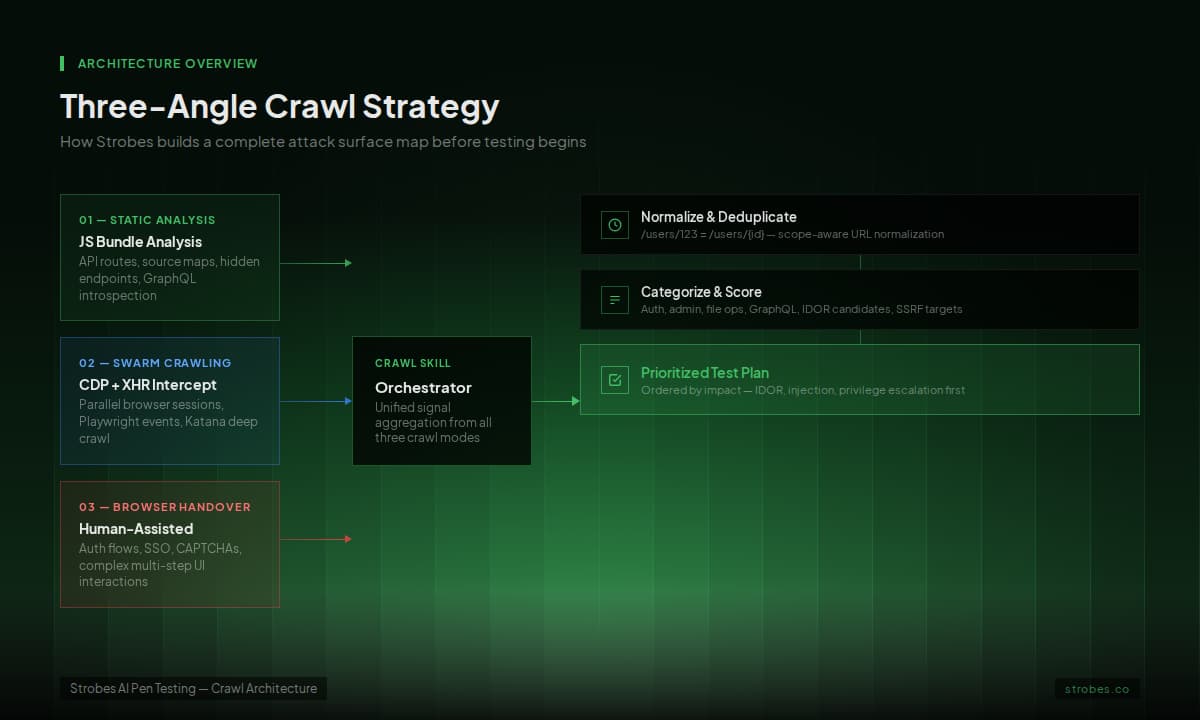
We don't rely on a single crawling strategy. We attack the problem from three angles, with automation doing the heavy lifting and human interaction reserved for the parts that actually need it.

1. Static Analysis: Reading the Source Code the AI Way
This is where AI agents genuinely shine — and it's our first line of attack.
Modern web applications ship their entire API surface to the browser. It's right there in the JavaScript bundles: every route definition, every fetch call, every axios configuration, every hardcoded API base URL. You just need to read it.
We built a purpose-built analysis pipeline that approaches frontend code the way a human security researcher would, but faster.
First, it identifies what it's looking at. Is this a Next.js SSR app? A React SPA? Angular? Vue? A legacy jQuery multi-page app? Each framework stores its routing and API configuration differently, and knowing the framework tells you exactly where to look.
For Next.js apps, we extract __NEXT_DATA__ — the server-side props that often contain API URLs, build IDs, and sometimes sensitive configuration. We pull the build manifest to get every page route. We check /_next/data/ endpoints for JSON data leaks.
For SPAs, we download the JavaScript bundles and run pattern extraction. Not just simple regex — we look for React Router path definitions, Angular route configs, Vue Router declarations, axios base URL configurations, fetch wrapper patterns, and template literal API calls. We resolve template variables (${"{userId}"}) into wildcard patterns so we know the shape of the endpoint even if we don't have a specific ID.
Then there's source map analysis. A surprising number of production applications ship source maps — .map files that contain the original, unminified source code. When we find them (and we always check), we get the complete, readable source. Every API call. Every route. Every environment variable that got baked into the build. Sometimes even hardcoded API keys and secrets.
We also check the usual suspects automatically: /robots.txt, /sitemap.xml, /.well-known/, /swagger.json, /openapi.json, /api-docs, and framework-specific paths. For GraphQL endpoints, we run introspection queries to get the full schema in one shot.
2. Swarm Crawling: CDP, XHR Interception, and Cloud Browsers
For the parts where automated crawling makes sense — hitting known URLs, following links, triggering lazy-loaded content — we don't crawl sequentially. We swarm.
Traditional crawlers are polite. They visit one page, wait for it to load, parse it, add new URLs to the queue, and repeat. This is painfully slow on modern SPAs where a single page load triggers dozens of API calls and the real content doesn't appear until three JavaScript frameworks finish hydrating.
The Bedrock Browser Infrastructure
Our crawling runs on cloud-hosted browser sessions powered by AWS Bedrock's AgentCore. Instead of spinning up local headless Chrome instances that eat memory and fall over, we connect to remote browser sessions via the Chrome DevTools Protocol (CDP).
The key insight: Playwright connects to these cloud browsers over CDP WebSocket, giving us full browser control without running anything locally. The browser is remote, managed, and scalable — but from our agent's perspective, it's just a normal Playwright page object.
XHR Interception via Playwright Events
Before the crawler navigates anywhere, we inject network interception hooks through Playwright's event system. This captures everything — every XHR, every fetch call, every image load, every WebSocket upgrade attempt. When the crawler visits a single SPA route, the browser fires all its API calls, and we capture every one. A single page visit might discover ten API endpoints that would be invisible from looking at the HTML alone.

Parallel Route Visiting and Swarm Agents
We don't just follow <a> tags. We extract routes from the DOM — React Router to attributes, Vue Router links, navigation elements — build a list, and hit them systematically. We also integrate Katana for deep crawling. Katana can connect to the same Bedrock browser session via a presigned WebSocket URL, so it crawls as a logged-in user rather than an anonymous visitor. This catches the 80% of the application surface that sits behind authentication.

The key optimization is scope-aware deduplication. /users/123 and /users/456 are the same endpoint. We normalize URLs by replacing numeric and UUID segments with placeholders and maintain a set of normalized paths. This cuts crawl time dramatically on applications with thousands of resource pages.

3. Browser Handover: Humans for the Hard Parts
The first two approaches — static analysis and swarm crawling — are fully automated and catch the vast majority of endpoints. But some things genuinely need a human.
Complex multi-step forms. SSO flows that redirect through three different identity providers. CAPTCHAs. Applications where the interesting functionality only appears after performing a specific sequence of business actions. These are the cases where we hand the browser over.
When the agent encounters something it can't automate — or when it wants to maximize coverage early in a test — it hands the browser session to the user. Literally. The user gets a live browser session, either in their own browser via our Chrome extension, or through a cloud-hosted session they can interact with directly.

The user browses the application naturally. They log in — handling whatever MFA, CAPTCHA, or SSO flow the app throws at them. They click through the features they care about. They explore the admin panel. They fill out a form and submit it.
While the user browses, the same Playwright XHR interception hooks are silently capturing everything. Every HTTP request. Every API call. Every WebSocket message. Every XHR that fires when you open a dropdown. The agent is building a complete map of the application's network traffic without clicking a single button.

This is especially powerful for authentication. Instead of the agent fumbling with login forms, CAPTCHA solvers, and SSO redirects, the human logs in once. The agent captures the cookies, tokens, and session data from the authenticated browser, saves them, and reuses them for every subsequent automated crawl and test.
Packaging It All: The Crawl Skill
Here's where it gets interesting from an engineering perspective. We didn't just build these capabilities and hardcode them into the agent. We packaged the entire crawling pipeline as a skill — a self-contained module that the AI agent can load and execute on demand.
When a pen test kicks off, the agent loads the crawl skill and it takes over. The skill orchestrates the full pipeline: spinning up the Bedrock browser session, injecting XHR interception via CDP, running static analysis on JS bundles, performing swarm crawls across discovered routes, and optionally handing the browser to the user for complex flows.
What makes this powerful is the data flow. The crawl skill writes everything to a structured workspace — auth cookies, captured XHR requests, API endpoints from bundle analysis, Katana deep crawl results. Once crawling is complete, the agent can load all that data, query it, filter it, and use it to drive the testing phase.
This separation matters more than it sounds. The crawl skill can evolve independently — new discovery techniques, new tools, better deduplication — without touching the agent's core logic. And because it's a skill, different agents can use it. The web pen test agent loads it for endpoint discovery. The API pen test agent loads it for route mapping. The code review agent can cross-reference crawl data with source code findings.
It also means the crawl runs efficiently. Instead of the agent making dozens of individual tool calls to crawl each page (burning context window and tokens), the skill executes the entire crawl as a batch operation. One skill invocation, hundreds of endpoints discovered, structured results ready for consumption.
How These Three Approaches Work Together
The real power isn't in any single approach — it's in the combination, with each technique covering the others' blind spots.
Static analysis runs first and runs fast. It finds the endpoints that neither of the other approaches would catch: API routes defined in code but not linked from any UI, admin endpoints not in any navigation menu, deprecated-but-still-active endpoints that the frontend used to call but doesn't anymore. It also identifies the tech stack, which tells the swarm crawler how to extract routes more effectively.
Swarm crawling systematically covers the breadth of the application. It hits every route the static analysis found, triggers every lazy-loaded component, and captures every XHR call across the full URL space — all through CDP-connected cloud browsers with Playwright interception running on top.
Browser handover fills the gaps that automation can't reach: complex auth flows, multi-step business logic, UI interactions that require human judgment. It's the last piece, not the first — used surgically for the 10-20% of the app that resists automated discovery.
Together, they build a comprehensive attack surface map. The agent then categorizes every discovered endpoint by function — auth, admin, file operations, search/filter, GraphQL, data mutation — scores them by security relevance (IDOR candidates, injection points, SSRF targets, privilege escalation opportunities), and generates a prioritized test plan.
The agent doesn't just find endpoints. It understands what kind of vulnerability each one is most likely to have, and it tests them in order of impact. For a deeper look at how Strobes approaches the full web application penetration testing process, including what happens after crawling, see our complete checklist.
Why This Matters
Here's the bottom line: an AI pen testing agent is only as good as its attack surface map. If your crawling is incomplete, your testing is incomplete. You can have the most sophisticated SQL injection detection in the world, but if you never found the search endpoint because it's only accessible through a dropdown menu that loads via JavaScript, it doesn't matter.
The industry has been trying to solve this by making AI agents better at clicking buttons. We think that's the wrong approach. Instead of forcing AI to do what it's bad at, we built a system that leads with automation — static analysis and instrumented browser crawling — and brings humans in only for the parts that genuinely need them.
The result is faster, more complete coverage than either humans or AI could achieve alone. That's the whole point of Continuous Threat Exposure Management — not replacing human judgment, but applying it exactly where it has the most leverage.
If you're curious how this compares to traditional approaches, our breakdown of pentesting vs PTaaS vs automated pentesting covers the tradeoffs in detail. And if you want to see how attack surface discovery feeds into a broader exposure program, the guide on attack surface management is a good next read.